The “Second Brain” Trap: Is Your Note-Taking App Making You Less Productive?
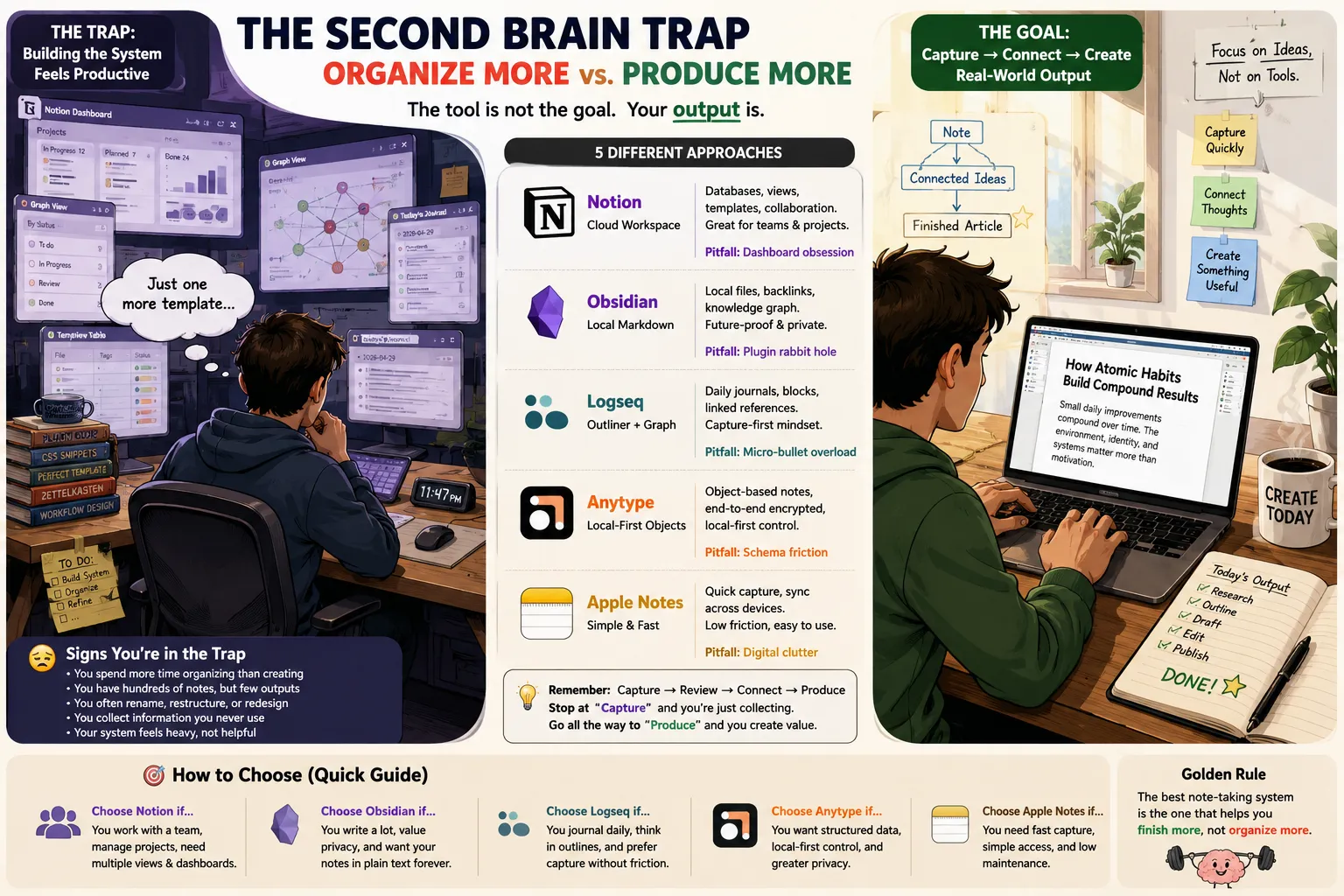
There is a strange moment in modern knowledge work when productivity quietly turns into interior design. You open a note-taking app to write down an idea. Forty minutes later, you are choosing icon colors, renaming database properties, testing a calendar widget, and deciding whether “Books” should be related to “Authors,” “Ideas,” “Projects,” or all three. The note still contains one sentence. This is the second-brain trap: building an elaborate system for future thinking while avoiding the thinking that needs to happen today. Tools such as Notion, Obsidian, Logseq, Anytype, and Apple Notes can all improve the way information is captured and retrieved. They can also create an endless maintenance project involving tags, templates, plugins, links, folders, schemas, dashboards, and migration plans. The problem is rarely that the app is bad. The problem is that organizing information produces an immediate feeling of control, while writing, deciding, and creating remain uncertain and difficult. In this editorial comparison, we examine five different approaches to personal knowledge management and ask a more useful question than “Which app has the most features?” Which system helps you produce useful work with the least ongoing maintenance? Quick Comparison Tool Main philosophy Storage approach Best for Most common productivity trap Notion Structured cloud workspace Cloud-based pages and databases Teams, projects, shared information and visual workflows Designing dashboards instead of completing tasks Obsidian Local-first linked notes Local Markdown files, with optional sync methods Research, writing and long-term personal knowledge Installing plugins and building graphs without using the notes Logseq Journal-first networked outliner Local graph built around blocks and linked pages Daily notes, research logs and bullet-based thinking Splitting every thought into tiny disconnected blocks Anytype Local-first object workspace Local-first structured objects with synchronized spaces Users who want structured data with more privacy control Designing object types before understanding the actual workflow Apple Notes Low-friction capture Device and iCloud-based synchronization Quick notes, scans, checklists and everyday reference Accumulating hundreds of unreviewed notes No numerical score is included because these tools solve different problems. A shared team wiki should not be rated using the same criteria as a private writing archive or a grocery-list app. How We Evaluated the Tools A note-taking app should not be evaluated by how impressive it looks when empty. We focused on five practical tasks: Capture a new idea in less than 30 seconds. Retrieve a note created several weeks earlier. Connect information to an active project. Turn notes into a finished document or decision. Maintain the system without constant reorganization. For each tool, the most revealing question was: After the note is saved, what has to happen before it becomes useful again? A highly structured system may improve retrieval, but every property, tag, relation, template, and folder also creates a small maintenance cost. The best structure is therefore not the most detailed one. It is the minimum structure that reliably helps the user retrieve and apply information. 1. Notion: The Workspace That Can Become the Work Notion is exceptionally good at making information feel organized. A plain page can become a task database. The same database can then appear as a table, board, calendar, timeline, gallery, or filtered project view. Documents, meeting notes, project plans, client records, and internal reference material can exist in one shared workspace. That flexibility is Notion’s greatest advantage. It is also the source of its most common failure. Where Notion Works Well Notion is strongest when information needs to be: Shared with several people Viewed in multiple formats Connected to projects or clients Filtered by status, owner or deadline Presented clearly to non-technical users Updated through repeatable templates For a small team, one project database can replace separate task lists, status documents, meeting logs, and roadmaps. Its visual structure also makes it easier to build client-facing or management-facing pages than in a folder of ordinary text documents. The Dashboard Obsession Notion makes system-building feel productive because every improvement is visible. Users can spend hours: Selecting cover images Creating linked database views Adjusting formulas Building personal homepages Adding weather or habit widgets Designing complex templates Creating status fields for tasks that barely exist The result may look like a business operating system while containing very little completed work. This is not entirely Notion’s fault. The platform simply makes customization rewarding. The real test is whether the dashboard changes a decision or helps complete a task. If it only displays information more beautifully, its value may be lower than it appears. A Useful Notion Rule Do not create a new database until at least one of these conditions is true: The same type of information appears repeatedly. The information needs filtering or sorting. Several people need to update it. A simple page or checklist has become difficult to manage. Until then, use a normal page. Best For Notion is a strong choice for: Team documentation Project tracking Editorial calendars Client portals Product roadmaps Repeatable operational workflows Structured information that needs several views Poor Fit It may be unnecessary for: Private journals Fast idea capture Long-form writing without database needs Users who repeatedly rebuild their system Sensitive information requiring a different storage policy Verdict Notion is powerful when the database reflects real work. It becomes a problem when the user starts producing a workspace instead of producing outcomes. 2. Obsidian: The Writing Archive That Can Become a Software Project Obsidian appeals to users who want their notes to remain readable outside a single platform. Notes are stored as Markdown files inside a local vault. That means the underlying text can generally be opened using other editors even if the user later leaves Obsidian. For writers, researchers, developers, and long-term note keepers, that portability is a meaningful advantage. Where Obsidian Works Well Obsidian is particularly effective for: Long-term research Writing projects Personal reference libraries Technical documentation Notes that benefit from links and backlinks Users who prefer keyboard-driven workflows People who want control over local files The basic linking system is simple: [[Related Note]] Over time, these links can reveal useful relationships between concepts, sources, people, and projects. The backlink panel is often more useful than the visual graph because it shows exactly which notes refer to the current topic. The Graph View Illusion The graph view is visually persuasive. A large network of colorful nodes creates the impression that a sophisticated knowledge system exists. However, the number of connections does not prove that the notes are useful. A graph may contain: Imported highlights that were never reviewed Automatically generated daily notes Links created only to improve graph density Hundreds of short notes with no active purpose Old ideas that never influenced a decision The graph looks intelligent because the connections are visible. That does not mean the user is thinking more clearly. The Plugin Rabbit Hole Obsidian can be expanded through themes, community plugins, queries, automation, templates, metadata, custom styling, and publishing workflows. This makes it unusually adaptable. It also means the note-taking app can slowly become a software-maintenance hobby. A user may spend more time configuring: Dataview queries Templater scripts Folder conventions YAML properties CSS snippets Capture shortcuts Sync workflows Custom task systems …than writing the document that justified the system. A Useful Obsidian Rule Start with only: Notes Folders Links Search One daily-note template Do not install a plugin until a repeated problem appears at least three times. This prevents imagined future needs from shaping the entire system. Best For Obsidian is a strong choice for: Long-form writers Researchers Academics Developers Privacy-conscious personal knowledge management Users who value portable plain-text files Poor Fit It may frustrate users who: Want instant collaboration Dislike file and folder management Need a polished shared workspace Constantly experiment with plugins Expect the graph itself to produce insights Verdict Obsidian is excellent when it remains a writing and retrieval environment. It becomes counterproductive when the vault is treated like a product that must be continuously developed. 3. Logseq: Daily Thinking Without Deciding Where Everything Belongs Logseq approaches note-taking from the daily journal. Instead of asking the user to choose a notebook or folder before writing, it encourages information to begin inside today’s page. Individual blocks can then be linked, referenced, tagged, scheduled, or connected to other pages. This can remove one common source of friction: Where should this note go? The immediate answer is often: write it today and organize it only when necessary. Where Logseq Works Well Logseq is useful for: Daily work logs Research journals Meeting notes Task capture Bullet-based thinking Recording decisions over time Connecting repeated topics across daily entries The journal structure reflects how work actually happens. Information arrives during a specific day, even when its final category is unclear. The Micro-Bullet Problem An outliner encourages users to divide thoughts into increasingly small pieces. That is useful for tasks and observations. It is less useful when every argument, paragraph, quote, and idea becomes an isolated block. Over-segmentation can make it difficult to: See the full argument Read a note as a coherent document Move from fragments to long-form writing Understand which ideas matter most Distinguish permanent knowledge from daily activity The user may capture everything while developing very little. A Useful Logseq Rule Use blocks for: Tasks Meeting observations Short references Questions Temporary thoughts Convert important groups of blocks into a proper page or document when they begin supporting a larger argument or project. Capture should remain fast, but synthesis still requires deliberate effort. Best For Logseq is a good fit for: Researchers keeping chronological logs Users who naturally think in outlines People who dislike choosing folders before writing Daily task and meeting capture Notes that need block-level references Poor Fit It may be less comfortable for: Polished long-form drafting Users who prefer traditional documents Teams needing a visually simple shared workspace People who turn every sentence into metadata Verdict Logseq reduces the pressure to organize information before capturing it. Its danger is making fragmentation feel like understanding. 4. Anytype: Structured Privacy Without the Traditional Cloud Workspace Anytype attempts to combine two ideas that are often separated: Structured objects and relations Greater control over locally stored information Instead of treating everything as a document, Anytype lets users work with different object types, such as people, projects, books, tasks, or notes. Those objects can have templates, properties, relations, and different visual layouts. This can be attractive to users who like Notion’s structured approach but want a more local-first architecture. Where Anytype Works Well Anytype can be useful when information has repeatable structure. For example, a book record might contain: Author Reading status Rating Related notes Topic Publication year A project might contain: Status Deadline Related people Tasks Reference material This object-based model can provide consistency without requiring every record to be designed from the beginning. The Schema-First Trap Any structured workspace can encourage users to model the world before they have enough information. Users may spend time deciding: Whether an item is a Note, Page, Project, Set, Collection, or custom type Which properties every object needs Which relationships should be bidirectional Whether two similar object types should be merged How every view should be filtered The system becomes logically elegant but practically tiring. This is the same productivity trap as dashboard design, expressed through information architecture instead of visual styling. A Useful Anytype Rule Begin with a small number of object types: Note Project Person Resource Add another type only when the existing structure repeatedly creates confusion. Do not design the complete ontology of your life during the first week. Privacy and Data-Control Caveat “Local-first” does not automatically mean: No data ever leaves the device Every feature works permanently offline Backups happen automatically Sync cannot fail No account or recovery setup is required Users should review the current product documentation, sync design, backup process, encryption details, export options, and recovery method before storing important information. Best For Anytype may suit: Users who want structured personal databases People interested in local-first tools Private personal knowledge systems Users who think naturally in entities and relationships Poor Fit It may feel excessive for: Quick capture Simple writing Users who dislike schemas Teams requiring conventional cloud collaboration People who have not yet defined what they need to manage Verdict Anytype is promising when the structure serves a stable workflow. It becomes frustrating when the user tries to design every object before producing any meaningful content. 5. Apple Notes: The Boring App That Often Wins Apple Notes does not usually appear in screenshots of elaborate “second brain” systems. That may be one of its advantages. The app is designed around immediate capture. A new note can contain text, a checklist, image, scan, link, drawing, audio-related content, or attachment without requiring the user to select a database schema. For many people, that is enough. Where Apple Notes Works Well Apple Notes is useful for: Quick ideas Shopping lists Document scans Reference images Meeting notes Travel information Shared household notes Temporary project material Notes that need to be available across Apple devices The interface creates very little pressure to build a system before writing. The Thousand-Note Problem Low friction creates another problem: accumulation. Because saving a note is so easy, users can end up with: Untitled notes Old links Temporary lists Duplicate scans Forgotten screenshots Notes named “New Note” Information that is technically saved but practically lost A simple app still needs lightweight maintenance. A Useful Apple Notes Rule Use only a few folders: Inbox Active Projects Reference Archive Process the Inbox occasionally. Search is usually more valuable than building dozens of narrow folders. Pin only notes that are currently active. Best For Apple Notes is often the best choice for: Fast capture Everyday personal information Users already inside the Apple ecosystem People who do not need database views Anyone whose previous productivity system became too complicated Poor Fit It may be limiting for: Large research libraries Advanced querying Complex project databases Cross-platform workflows outside Apple devices Highly structured team operations Verdict Apple Notes is not the most powerful tool in this comparison. It may still produce the highest return because it demands so little attention from the user. The Real Productivity Problem Is Not Capture Most note-taking systems are good at saving information. The failure happens later. A useful knowledge workflow requires four separate actions: Capture → Review → Connect → Produce Many second-brain systems stop after the first action. Capture Saving a quote, link, highlight, meeting note, or idea. This feels productive because something visible has been collected. Review Deciding whether the information remains useful. Most digital hoards grow because this step never happens. Connect Relating the note to a current question, project, decision, or argument. Links that exist only for visual completeness do not count. Produce Using the information to create: An article A presentation A decision A product requirement A research conclusion A completed task A note that never influences output may still be personally meaningful, but it should not automatically be described as a productivity asset. A Simple Test: Is Your Second Brain Helping? Ask these six questions. Can you capture an idea within 30 seconds? When capture requires choosing seven properties, the system is too complex. Can you retrieve last month’s important decision? If you remember saving it but cannot find it, the system is not functioning as external memory. Do you review captured information? An inbox without review is storage, not knowledge management. Does linking change your understanding? A backlink should help reveal context—not simply increase the number of nodes in a graph. Has the system contributed to a finished output? Count completed articles, decisions, projects, or solutions—not notes created. Can you stop maintaining the system for one month? When the system collapses without constant tagging and repair, it may be too fragile. The Minimum-Viable Second Brain A useful system does not need dozens of note types. For most individuals, the following structure is enough: Inbox Everything begins here when its purpose is unclear. Active Projects Only information connected to current work. Reference Material likely to be used again. Archive Completed or inactive information worth retaining. Weekly Review Once a week: Delete obvious noise Move useful notes Link only what matters Extract actions Select one idea to develop The weekly review matters more than the exact app. Which Tool Should You Choose? Choose Notion when: Several people need shared information Projects require statuses, owners and dates The same data needs multiple views Visual presentation matters You are willing to maintain structured databases Choose Obsidian when: Writing and research are the primary outputs Local Markdown files matter You want long-term portability Links and backlinks support your thinking You can resist excessive plugin customization Choose Logseq when: You prefer daily journals and outlines Work arrives as a continuous stream Block references are useful Choosing folders before writing creates friction Choose Anytype when: You want a local-first structured workspace Objects and relations match how you think You are comfortable defining a limited schema Privacy architecture is important enough to investigate carefully Choose Apple Notes when: Speed matters more than customization You mainly need capture, scanning and retrieval Complex systems have previously failed You work primarily across Apple devices Final Verdict The best note-taking app is not the one that can model every part of your life. It is the one that disappears when the real work begins. Notion is excellent for shared, structured operations, but its visual flexibility can turn workspace design into a substitute for execution. Obsidian provides a strong foundation for writing and long-term personal knowledge, but plugins and graph customization can transform a text archive into a permanent software project. Logseq makes daily capture natural, although constant micro-bullets can prevent ideas from becoming coherent arguments. Anytype offers an appealing structured, local-first direction, but object design can introduce unnecessary schema friction. Apple Notes lacks the drama of a futuristic second brain, yet its low maintenance may make it the most productive choice for users who simply need to remember and retrieve information. The goal is not to build a perfect digital replica of your mind. The goal is to forget less, decide better, and finish more. Frequently Asked Questions What is a second brain? A second brain is an external system for capturing, organizing, retrieving, and applying information. It may include notes, documents, bookmarks, highlights, tasks, and project material. Does linking more notes improve thinking? Not automatically. Links are useful when they reveal relevant context or support an active project. Creating links only to make a graph look complete adds maintenance without guaranteed insight. Is Notion better than Obsidian? Notion is generally better suited to collaborative databases and shared workspaces. Obsidian is often better suited to local files, writing, personal research, and long-term note portability. Do I need a knowledge graph? Most users do not need one. Search, folders, a small number of links, and regular review may be sufficient. Why do productivity systems become procrastination? System design offers clear, controllable tasks with immediate visual rewards. Creative work involves uncertainty, judgment, and the possibility of failure, so reorganizing the system can feel safer. How many folders or tags should I use? Begin with as few as possible. Add a folder, tag, property, or object type only when it solves a repeated retrieval problem. Can Apple Notes manage a large note library? It can handle substantial everyday collections, but users with advanced research, metadata, cross-platform or database requirements may eventually prefer a more specialized tool.

Evernote - Note Organizer